
UDI and Device Identification
Universal Device Identification, or UDI, is a standardized barcode system that uniquely identifies medical devices. Tenovi devices carry UDI barcodes on packaging and the device itself. The primary value for integrations is extracting the MAC address embedded in the UDI string, which you can use to look up complete device records, verify inventory, and manage device lifecycle operations.
How UDI Works
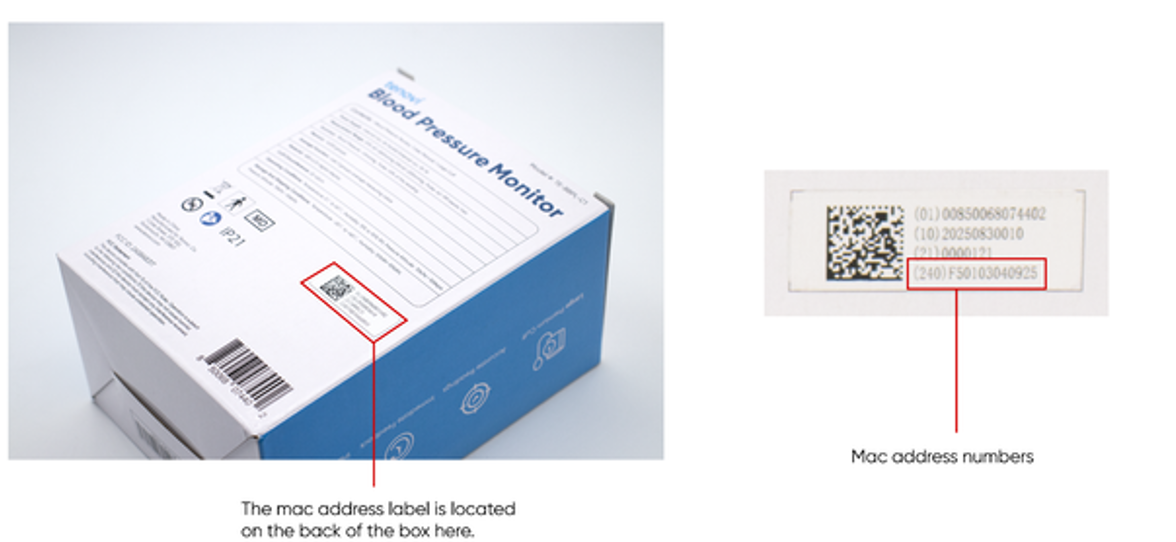
Section titled “How UDI Works”A UDI is composed of segments called Application Identifiers. Each Application Identifier is a two- or three-digit code that tells you what type of data follows. The Application Identifier you care most about is 240, which always contains the device MAC address or IMEI. Because the 240 Application Identifier is intentionally placed last in the UDI sequence, you can parse the MAC by counting backward from the end of the string, regardless of how your scanner is configured.
GS1 Standard
Section titled “GS1 Standard”Tenovi UDIs follow the GS1 standard, which the FDA recognizes as a valid UDI encoding method. Common Application Identifiers in a Tenovi UDI string include:
| Application Identifier Code | Description |
|---|---|
01 | GTIN (Global Trade Item Number) |
10 | Lot number |
17 | Expiration date |
21 | Serial number |
240 | MAC address or IMEI |
243 | Carton identifier |
Scanner Output Formats
Section titled “Scanner Output Formats”Different barcode scanners output UDI data in different formats. You may encounter:
- Raw string output with no delimiters between Application Identifier segments.
- Function character substitution where forward slashes are used as separators between Application Identifier segments.
- Parenthetical formatting where parentheses surround each Application Identifier code.
All three formats contain the same underlying data. Your parsing logic should account for these variations.
Extracting the MAC Address
Section titled “Extracting the MAC Address”The 240 Application Identifier always contains your device’s MAC address. Because it is positioned last, extract it by:
- Locating the
240identifier in the UDI string. - Reading all characters immediately following
240until the end of the string. - That value is your MAC address.
This approach works regardless of scanner configuration or output format.
Looking Up Device Data
Section titled “Looking Up Device Data”Once you have extracted the MAC address from the 240 Application Identifier, you can use the hwi-devices endpoint to retrieve complete device records, including activation status, assigned patient, and current gateway association. To find a specific device by MAC address, you can append the search query parameter:
GET https://api2.tenovi.com/clients/CLIENT_DOMAIN/hwi/hwi-devices/?search=123412341234 ©2026 Tenovi