
Error Messages & Debugging
This guide covers the errors you may encounter when working with the Tenovi Hardware Integration (HWI) API, what each one means, and how to resolve it. Errors are organized by HTTP status code — use the quick reference below to jump straight to yours, or work through the debugging checklist if you don’t yet have an exact error message.
Quick reference: jump to a status code
Section titled “Quick reference: jump to a status code”| Status | Meaning in the HWI API |
|---|---|
| 200 | Success (reads, unlink-gateway, failed-webhooks). |
| 201 | Created (devices, patients, webhooks, replacements, dropshipments, test/resend webhooks). |
| 400 | Validation error — field-keyed messages, listed per endpoint. |
| 401 | Bad, expired, or missing credentials (Invalid API key., missing header). |
| 403 | Blocked client account, read-only or endpoint-scoped key, cross-account key, or insufficient permissions. |
| 404 | Endpoint does not exist, or the requested record is not in your account’s scope. |
| 405 | HTTP verb not allowed on that endpoint. |
| 415 | Non-JSON content type. |
| 429 | Rate limit exceeded (1 request per second per API key). |
| 500 | Unexpected server error. |
Start here: debugging checklist
Section titled “Start here: debugging checklist”If you don’t have an exact error message to search for, work through these in order — they resolve the majority of HWI API errors:
- Read the HTTP status code first, then the body. The status tells you the category (auth, validation, rate limit); the JSON body tells you the specific cause.
- Check the trailing slash on your URL. A missing trailing slash triggers a redirect that drops your
Authorizationheader, surfacing as a401. - Confirm you’re using the right environment’s Api-Key. Development and production keys are not interchangeable.
- Confirm your
CLIENT_DOMAINmatches the key’s account. A mismatch surfaces as a403or404. - If requests are bursty, suspect rate limiting. A
429means you exceeded 1 request per second per API key — see 429 Too Many Requests. - For a
500, capture the timestamp and request details before retrying or contacting Tenovi support.
How HWI API errors are structured
Section titled “How HWI API errors are structured”Every error response includes an HTTP status code and a JSON body.
-
General errors (authentication, throttling, malformed requests) return a
detailfield:{ "detail": "Invalid API key." } -
Validation errors (
400) are keyed by the field that failed, with a list of messages:{ "device": ["This device type is not available for your account."] }For nested data, the key reflects the path, e.g.
patient.email.
The authentication and authorization errors below apply to every HWI API endpoint. The validation errors in the endpoint-specific reference apply only to the endpoint listed.
401 — Unauthorized
Section titled “401 — Unauthorized”This usually points to misconfiguration of your Api-Key placed in your API calls header. Tenovi Api-Keys require that you pass them in your authorization header.
If you are making use of development and production Tenovi logins, ensure you are using the correct Api-Key for your relevant environment.
This could also be caused by not having a trailing slash on the end of the URL for the endpoint, causing the request to redirect and drop the authorization headers.
Below is an example of a successful authorization setup using cURL.
curl --location --request GET 'https://api2.tenovi.com/clients/test-client/hwi/hwi-devices/' \--header 'Authorization: Api-Key xxxxxxxxxxxxx'The 401 responses you may see:
Message (detail) | What it means & how to fix |
|---|---|
Invalid API key. | An Authorization key was supplied but is not valid — a mistyped key, a revoked key, or a key for the wrong environment. Verify the key, or create a new one via the Client Dashboard. |
Authentication credentials were not provided. | No Authorization header was sent at all. Confirm the header is present and correctly named (Authorization: Api-Key <prefix>.<key>), and that a redirect (missing trailing slash) is not stripping it. |
403 — Forbidden
Section titled “403 — Forbidden”A 403 means your credentials were recognized but are not permitted to perform the request. Unlike a 401, retrying with the same key will not help — the key, account, or its scope needs to change. Double check your API keys, or create a new one via the Client Dashboard in the Tenovi web app.
Message (detail) | What it means & how to fix |
|---|---|
Client account is inactive or delinquent. | Your Tenovi client account is currently blocked (inactive, disabled, or delinquent). Contact your Customer Success Manager to restore access. |
This API key is read-only and cannot perform write operations. | The key is scoped read-only and was used for a POST, PUT, PATCH, or DELETE. Use a key with write access for these operations. |
This API key does not have access to this endpoint. | The key is scoped to a specific set of endpoints that does not include the one you called. Use a key scoped for this endpoint. |
This API key does not have access to this client account. | A key that manages multiple client accounts was used against a client it is not authorized for. Confirm you are targeting the correct CLIENT_DOMAIN and that the key has access to that account. |
404 — Not Found
Section titled “404 — Not Found”This error occurs if the endpoint you are requesting does not exist within the Tenovi API, or if the specific record you requested is not in your account’s scope.
Please verify the endpoint from our detailed API Reference and ensure you are using the appropriate CLIENT_DOMAIN value in your URL.
You can obtain the correct CLIENT_DOMAIN value from the Client Dashboard in the Tenovi web app. Once logged in, choose HWI Settings from the left sidebar.
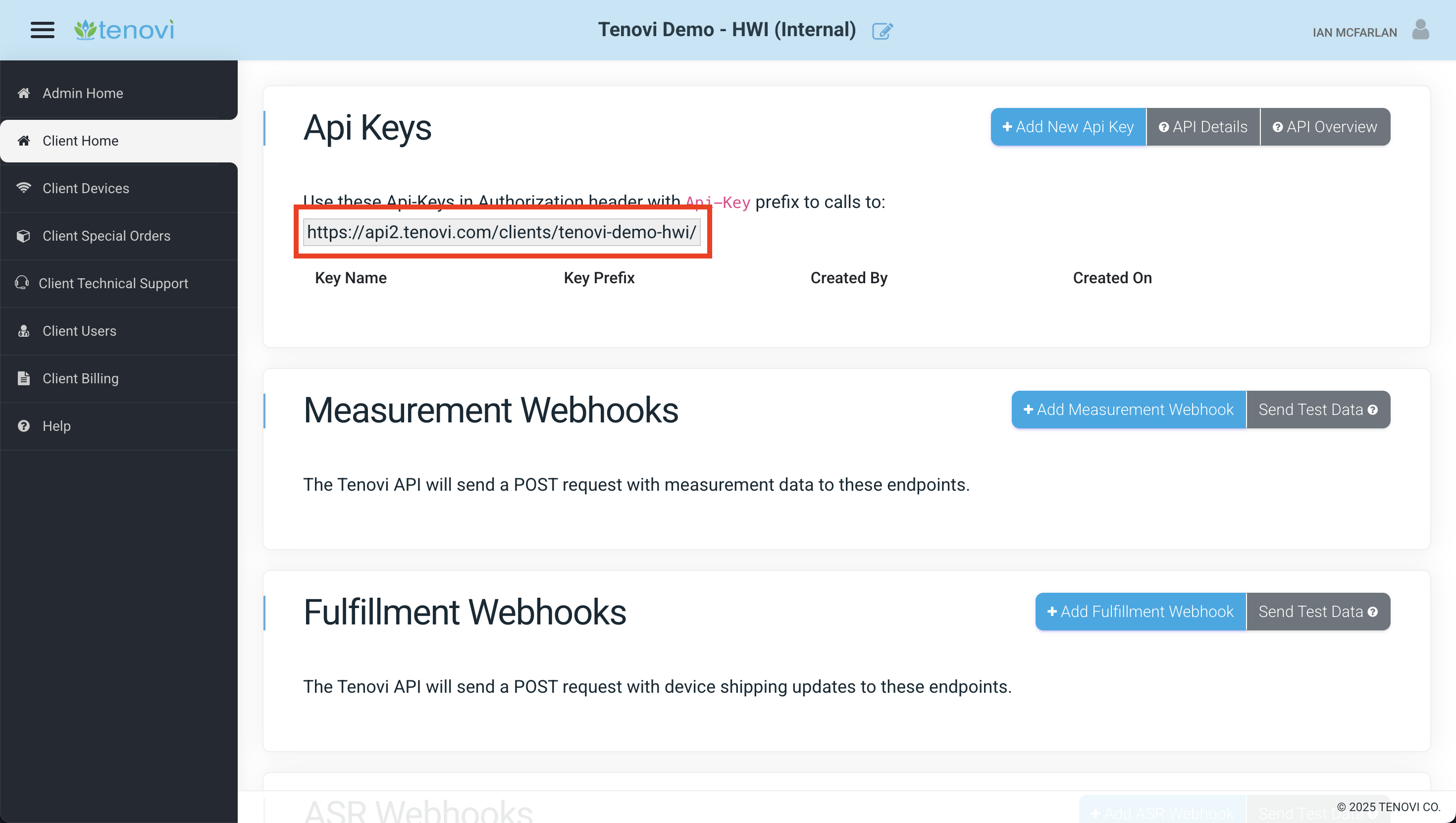
A 404 with the body { "detail": "Not found." } on a detail request (fetching, updating, or deleting a specific record) means the ID or lookup value does not exist within your account. Confirm the record belongs to the client account tied to your API key.
429 — Too Many Requests
Section titled “429 — Too Many Requests”You exceeded the rate limit of 1 request per second per API key. The request was not processed and nothing was changed, so it is safe to retry.
Wait at least one second before retrying, and pace subsequent requests at roughly 1.2 seconds rather than exactly 1 second. Timing a loop precisely on the one second boundary leaves no margin for network jitter and produces intermittent rejections.
The limit applies to the API key, not to each endpoint. Parallel workers sharing a key will trigger this even when each worker appears to be within the limit. Serialize the work instead of adding concurrency.
If you are running a large batch, reduce total call volume with pagination and server side filtering before increasing your delay. See the Pagination Guide and the Developer FAQ: What is the API rate limit, and why am I getting 429 responses?
The response body indicates how long to wait: Request was throttled. Expected available in N seconds.
Other standard HTTP errors
Section titled “Other standard HTTP errors”These can occur on any endpoint and are not specific to Tenovi.
| HTTP | Body (detail) | What it means & how to fix |
|---|---|---|
| 400 | JSON parse error - … | The request body is not valid JSON. Check for trailing commas, unquoted keys, or a truncated payload. |
| 405 | Method "X" not allowed. | The HTTP verb is not supported on this endpoint (for example, a DELETE on measurements, or a PUT on a read-only endpoint). Check the API Reference for the verbs each endpoint accepts. |
| 415 | Unsupported media type "…" in request. | The request was sent with a non-JSON content type. Send Content-Type: application/json. |
| 500 | (generic) | An unexpected server error. Retry the request; if it persists, contact Tenovi support with the timestamp and request details. |
Endpoint-specific validation errors (400)
Section titled “Endpoint-specific validation errors (400)”Validation errors return HTTP 400 with a field-keyed body. The tables below list the messages each endpoint can return, what triggers them, and how to resolve them.
Devices (hwi-devices)
Section titled “Devices (hwi-devices)”Returned when activating, updating, or deleting a device.
| Field | Message | What it means & how to fix |
|---|---|---|
device | Your account does not have an active HWI Plan. | Your account has no active HWI billing plan. Contact your Customer Success Manager. |
device | This device type is not available for your account. | The device name is not part of your account’s plan. Use the hwi-device-types endpoint to see the valid device names for your account. |
device | This device type is not enabled for your account. | The device type exists but is disabled for your account. Contact your Customer Success Manager to enable it. |
device | You cannot create a fulfillment request for a non-stocked device. | A fulfillment (shipping) request was made for a device type Tenovi does not stock. Non-stocked devices cannot be dropshipped. |
name | Device name is required | The nested device object is missing its name field. |
name | Invalid device name provided | The name does not match any device type. Confirm the exact name via hwi-device-types. |
sensor_id | A sensor_id is required for this device type | This device type requires a sensor_id in addition to the hardware_uuid. |
patient.email | A patient email address is required for this device type. | Certain device types (such as app-based/virtual devices) require a patient email on the nested patient object. |
hardware_uuid | A device with this hardware_uuid and sensor_code already exists in this account! | A device of this type is already linked to that Gateway on your account. See Device With This Gateway ID/Sensor Code Already Exists below. (The message includes , and sensor_id when a sensor_id also applies.) |
hardware_uuid | A device with this hardware_uuid and sensor_code is associated with another Client. Please contact Tenovi Customer Service to resolve this issue. | The device is already registered to a different Tenovi client account. Contact Tenovi support to resolve ownership. |
hardware_uuid | Only 6 devices with this sensor_code can be associated with one Gateway. | For device types that support multiple units sharing one Gateway, the per-Gateway cap of 6 for that sensor code has been reached. See How many devices can share a Gateway? below. |
mac_address | Mac Address must be a 12-digit hexadecimal string. | The mac_address is malformed. Provide a 12-character hexadecimal value. |
On delete, the response uses the error key:
| Message | What it means & how to fix |
|---|---|
You cannot delete devices with a completed Fulfillment Request attached to them. If you would like to unlink the Gateway associated with this device, please use the /unlink-gateway/ endpoint. | The device has a fulfilled shipping request and cannot be deleted. Use the unlink-gateway endpoint instead. |
Deletion failed: Unable to cancel Fulfillment Request attached to this device. If you would like to unlink the Gateway associated with this device, please use the /unlink-gateway/ endpoint. | The shipping order could not be cancelled, so the device cannot be deleted. Use the unlink-gateway endpoint instead. |
Device With This Gateway ID/Sensor Code Already Exists
Section titled “Device With This Gateway ID/Sensor Code Already Exists”This error occurs when Activating/Requesting a new Device, and the type of device being activated/requested (e.g., scale, BPM, etc.) is already connected to a Gateway with the supplied Gateway ID. As a rule, a Gateway carries only one device of each type (scale, BPM, etc.).
Please ensure the Gateway ID supplied is correct and verify there are no other Devices of the same type connected to that Gateway on the Client Devices Dashboard.
How many devices can share a Gateway?
Section titled “How many devices can share a Gateway?”For most device types, only one device of a given type (sensor code) can be connected to a Gateway at a time — activating a second device of the same type returns the “already exists” error above.
Some device types support multiple units sharing a single Gateway. For those, the hard cap is 6 devices with the same sensor code per Gateway; exceeding it returns Only 6 devices with this sensor_code can be associated with one Gateway.
Device Properties (hwi-devices/<id>/properties/)
Section titled “Device Properties (hwi-devices/<id>/properties/)”Returned when listing or setting device properties.
| Field | Message | What it means & how to fix |
|---|---|---|
hwi_device_id | A HwiDevice with this ID does not exist in our system. | The device ID in the URL was not found in your account. Confirm the hwi_device_id. |
Patients (hwi-patients)
Section titled “Patients (hwi-patients)”Returned when creating or updating a patient record.
| Field | Message | What it means & how to fix |
|---|---|---|
external_id | A Patient with this external_id already exists. | You attempted to POST a patient whose external_id is already in use. Use PUT/PATCH to update the existing record instead. See the Patients Object. |
external_id | This field is required. | The required external_id was omitted from the request body. |
Measurements (hwi-devices/<id>/measurements/)
Section titled “Measurements (hwi-devices/<id>/measurements/)”Returned when retrieving measurements for a specific device.
| Field | Message | What it means & how to fix |
|---|---|---|
hwi_device_id | A HwiDevice with this ID does not exist in our system. | The device ID in the URL was not found in your account. Confirm the hwi_device_id. |
Webhooks
Section titled “Webhooks”For creating and managing webhooks, see the Webhooks Overview.
-
hwi-webhooks(create / update): Standard field validation returns400with per-field messages when required fields such aseventorendpointare missing or invalid. -
Test webhooks (
test-webhooks/): Returns201on success.Field Message What it means & how to fix eventInvalid event type.eventmust beMEASUREMENTorFULFILLMENT.eventThis field is required.The eventfield was omitted. -
Resend webhooks (
resend-webhooks/): Returns201on success — even when zero events were replayed, so inspect thesummaryobject in the response.Field Message What it means & how to fix measurement_idThis field is required.No measurement_idwas supplied.measurement_idMeasurement does not exist.The measurement_idwas not found.client_deviceClient Device does not exist.A client_device_idwas supplied but does not resolve to a device.
Replacements (hwi-replacements)
Section titled “Replacements (hwi-replacements)”Returned when creating or deleting a device/Gateway replacement.
| Field | Message | What it means & how to fix |
|---|---|---|
related_client_device_id | Related Client Device not found. | The hwi_device_id on the request did not resolve to a device in your account. |
device_types | A replacement cannot include more than 2 Device Types. | Limit a single replacement request to at most 2 device types. |
device_name | <name> is not available for your account. | The requested replacement device type is not part of your account’s plan. |
device_name | <X> cannot replace a <Y>. | The replacement is not like-for-like (sensor-code mismatch, or an incompatible cellular replacement). |
device_name | <name> is a non-stocked item. | The requested replacement device type is not stocked by Tenovi. |
error (delete) | You cannot delete a Replacement after it has been shipped. | The replacement has already shipped and can no longer be cancelled. |
 ©2026 Tenovi